Decode every tracking tag.
Inside DevTools.
Capture, decode, and debug network requests from 59 marketing and analytics providers — right in your Chrome DevTools panel.
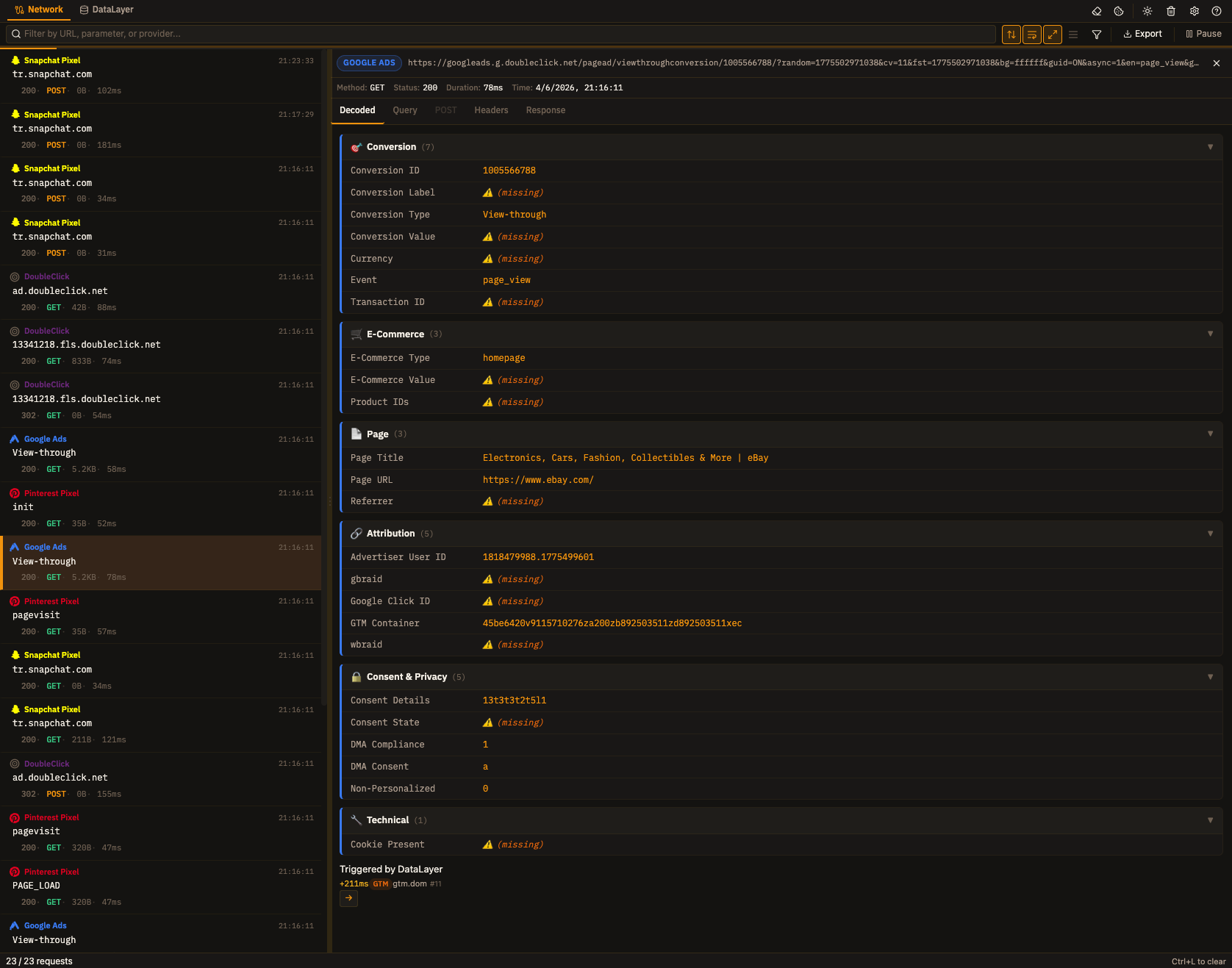
What sets it apart
Everything you need to debug tracking tags. Nothing you don't.
Request Decoding
Raw payloads decoded into human-readable parameters — grouped into collapsible provider-specific categories. 5 detail tabs: Decoded, Query, POST, Headers, Response.
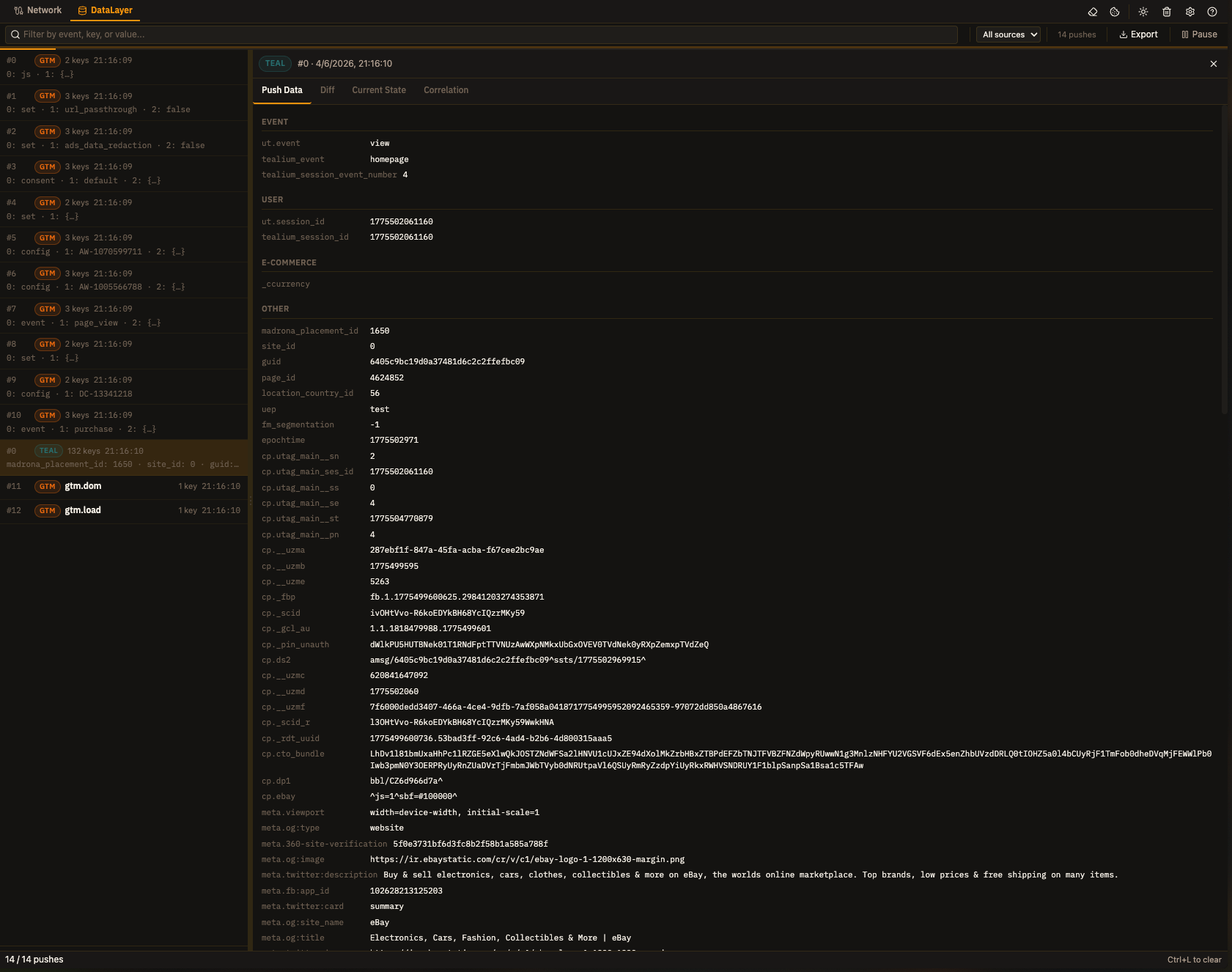
DataLayer Inspector
Intercept data layer pushes from GTM, Tealium, Adobe, Segment, and W3C digitalData. Deep diff, cumulative state, e-commerce detection, validation engine, watch paths, and network correlation — all in a dedicated tab.
59 Providers, 10 Categories
GA4, Adobe Analytics, Meta Pixel, TikTok, LinkedIn, Pinterest, Hotjar, HubSpot, Braze, mParticle, and 49 more. From analytics to CDPs.
Real-time Capture
Watch tracking requests flow in as they happen. Pause/resume, toggle sort order, auto-prune to keep things manageable.
DevTools Native
Lives inside Chrome DevTools. No separate window, no proxy setup, no browser extension conflicts. Manifest V3.
Advanced Filtering
Filter by URL, parameter name/value, event type, HTTP method, status, user ID. Per-provider show/hide popover with category grouping. Active filter chips with one-click removal.
Consent Panel
Inspect and override cookie/consent state on the inspected page. Test consent mode behavior without manually clearing cookies. One-click Clear Cookies for the inspected page.
Adobe Environment Switcher
Switch between DEV/ACC/PROD Adobe Launch environments using network-level redirects. Persists across page navigations.
Power User Features
Keyboard shortcuts (Ctrl+L clear, Ctrl+F search, ↑↓ navigate, Ctrl+Shift+F filter). Dark/light theme toggle. Compact row mode. Badge counter. Configurable settings panel.
Export & Share
Export captured requests as JSON or CSV. Share debug findings with your team or attach to bug reports.
Extension Popup
Live request count, total size, average duration, and success rate at a glance. Top 5 providers breakdown. Quick pause/clear controls without opening DevTools.
Up and running in 30 seconds
No setup, no configuration, no headaches.
Built for your workflow
Five ways to debug smarter.
QA & Implementation
Verify that tags fire correctly before deployment. Catch broken events, missing parameters, and misconfigured pixels. Streamline handoff between marketing and engineering.
Privacy & Compliance
See exactly what data leaves the browser. Audit tracking payloads for GDPR, CCPA, and internal policies. Use the Consent Panel to test consent mode behavior.
Performance Review
Identify redundant tracking calls, oversized payloads, and unnecessary third-party requests. Auto-pruning keeps things fast on high-traffic sites.
Adobe Stack Debugging
Switch between DEV/ACC/PROD environments at the network level. Debug Adobe Launch, Analytics, Target, Audience Manager — all in one panel.
DataLayer Validation
Define custom validation rules for data layer pushes. Watch specific dot-notation paths, detect missing keys, and validate e-commerce events. Catch data quality issues before they reach your analytics.
59 providers across 10 categories
If it tracks, TagDragon sees it.
Start debugging tracking tags today
Free. Open source (ISC). No account required.
Chrome Web Store · Manifest V3 · Chrome 102+ · No data leaves your browser